
 Back
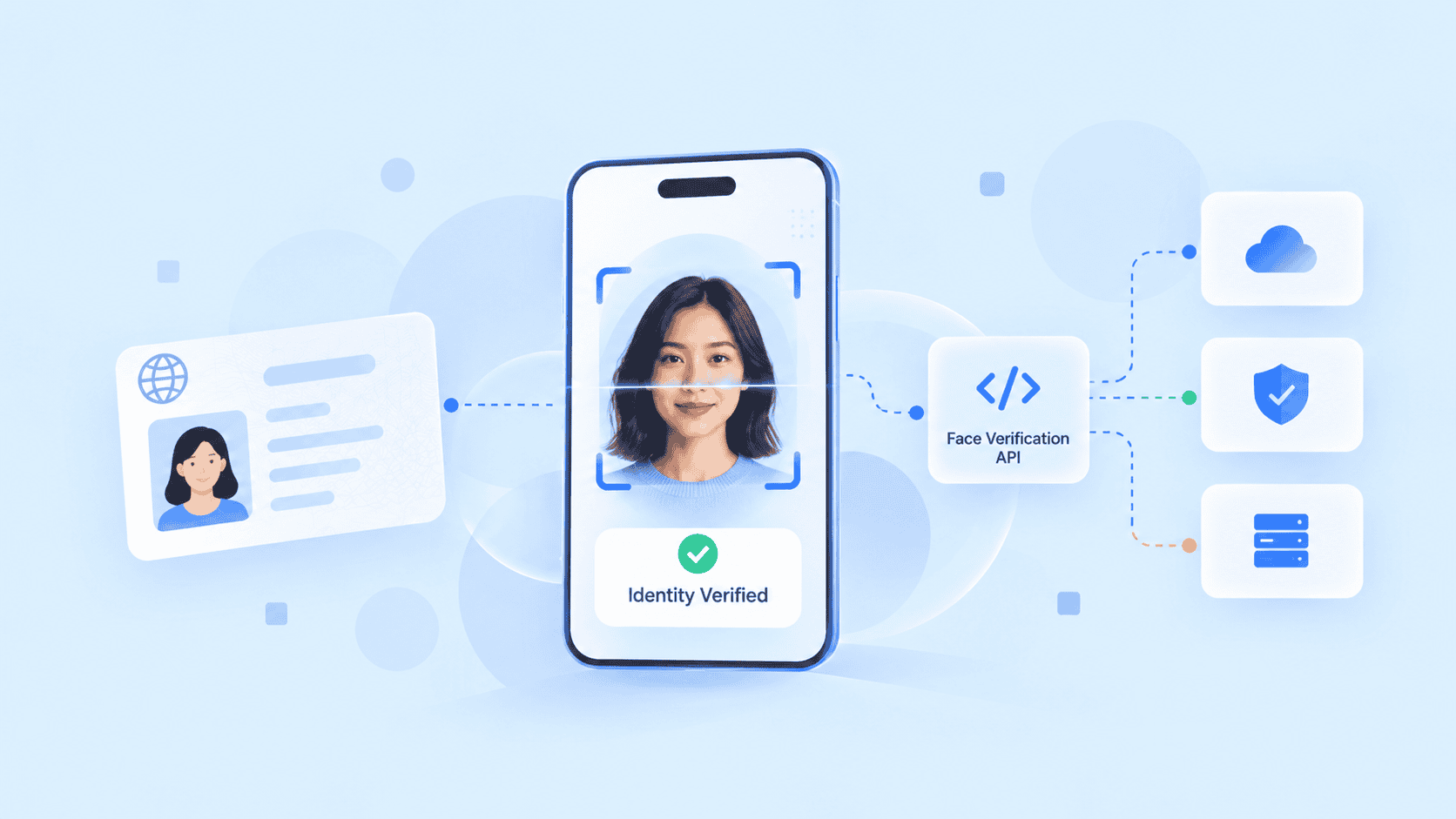
Building face verification into an application involves more than comparing two photographs. Developers need to consider image capture, matching accuracy, liveness detection, API performance, biometric data handling, and what happens when a legitimate user fails verification.
The right face verification software depends on how much control your application needs. Some solutions provide a straightforward face comparison API. Others offer complete identity verification workflows, while privacy-focused SDKs can perform biometric processing directly on a user’s device.
This guide compares 10 face verification APIs, SDKs, and developer frameworks for building 1:1 face matching into applications. It focuses on integration architecture, implementation trade-offs, and the technical requirements that matter when moving from a working prototype to production.
Key Takeaways
- A face verification API performs 1:1 face matching, comparing a captured face against a known reference rather than searching an identity database.
- Developers can choose between cloud APIs, on-device SDKs, managed verification workflows, and self-hosted facial recognition frameworks.
- Face matching alone does not establish liveness, document authenticity, or the user’s legal identity.
- Privacy architecture matters because cloud-based image processing and on-device biometric verification expose different types of data.
- Production deployments need calibrated matching thresholds, liveness controls, secure session handling, and fallback verification paths.
How Face Verification APIs Work
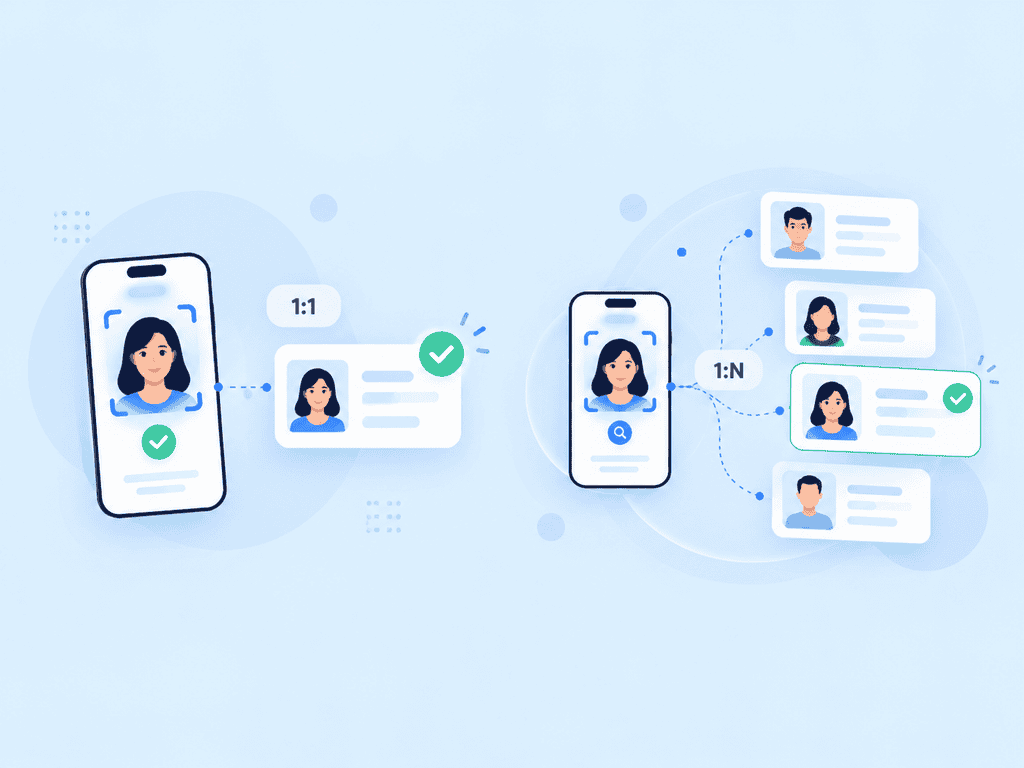
A face verification API compares two facial representations to determine whether they likely belong to the same individual.
In a typical 1:1 face matching workflow, the application captures a live selfie and compares it against an existing reference, such as an enrolled facial image or a photograph extracted from an identity document.
The process generally involves four stages:
- Face capture: The application obtains a facial image through a camera or an existing authorized reference.
- Preprocessing: Face detection and alignment prepare the images for comparison.
- Biometric matching: A facial recognition model extracts distinguishing features and calculates similarity.
- Verification decision: The application evaluates the similarity result against a defined threshold and any additional security checks.
A face verification API usually returns a similarity score, confidence-related output, or match decision. The application must interpret that result according to its security requirements.
Face Verification vs. Face Recognition
Although the terms are sometimes used interchangeably, they describe different operations.
| Technology | Primary Function | Typical Application |
| Face detection | Locates faces within an image | Camera capture validation |
| 1:1 face verification | Compares one face against a claimed identity | Login, account recovery, KYC |
| 1:N face identification | Searches for a face across multiple enrolled identities | Identity lookup and access systems |
| Liveness detection | Evaluates whether the biometric presentation is genuine | Spoofing and replay attack detection |
This distinction matters when choosing an API.
A developer building selfie-based account authentication usually needs 1:1 verification, not a system designed to search millions of faces.
Likewise, face matching does not automatically confirm that an image comes from a live person. Applications exposed to impersonation and presentation attacks need a separate liveness or capture-integrity control.
For a closer explanation of these controls, see what liveness detection is and how it works.
10 Face Verification APIs and SDKs for Developers
The following options cover different implementation models, including privacy-preserving biometric SDKs, direct image-comparison APIs, managed KYC workflows, and open-source frameworks.
They are not ranked by independently measured recognition accuracy. The comparison focuses on how each option fits a developer’s integration requirements.
1. PrivateID: Privacy-Preserving, On-Device Face Verification
PrivateID provides biometric verification technology designed to process facial information locally rather than relying on conventional cloud-based image matching.
Its architecture uses on-device biometric processing and homomorphic tokenization to compare a newly captured facial sample against a previously registered biometric reference.
Instead of requiring raw facial images to be transmitted for matching, the system creates privacy-preserving tokens that support biometric comparison.
For developers, this changes the integration architecture. Facial capture, preprocessing, token generation, and comparison can occur on the device, reducing the need to transmit raw biometric imagery to an external matching service.
Developer capabilities:
- On-device biometric capture and processing
- Privacy-preserving 1:1 facial verification
- Homomorphic biometric tokenization
- Passive liveness detection
- SDK options for web and native applications
- Verification sessions tied to user and session context
PrivateID’s verification protocol also supports session metadata, including device information and cryptographic challenges, to help bind verification to a particular authentication attempt.
Its documented verification operation uses POST /v2/verification-session for session-based verification.
A practical implementation is returning-user authentication. After registration, an application can request a fresh facial verification against the enrolled biometric reference without building a conventional centralized face-image matching system.
Best for: Privacy-focused authentication, financial applications, account recovery, returning-user verification, and applications seeking to minimize raw biometric image transmission.
Integration consideration: Developers should review SDK support, token lifecycle management, registration requirements, and how verification results are incorporated into existing authentication sessions.
2. Amazon Rekognition: Cloud-Based Face Comparison API
Amazon Rekognition provides image analysis and facial recognition capabilities through AWS.
Its CompareFaces operation compares a face in a source image against detected faces in a target image. Although the API can evaluate multiple target faces, developers can use it for controlled 1:1 verification by enforcing one valid face per input.
Images can be supplied as bytes or stored in Amazon S3.
The API returns information such as similarity scores, face detection confidence, image quality attributes, and face location data.
Developer capabilities:
- REST API access through AWS
- Integration with AWS SDKs
- Configurable similarity thresholds
- Image quality filtering
- Amazon S3 image references
- AWS IAM-based access controls
Developers can specify parameters such as SimilarityThreshold and QualityFilter to control returned matches and filter unsuitable images.
The official Amazon Rekognition CompareFaces API documentation explains the request parameters and response structure.
Amazon Rekognition is useful for teams already operating within AWS because it fits existing infrastructure for authentication services, application backends, and monitoring.
However, CompareFaces alone does not provide complete identity proofing. Developers must add appropriate liveness, document validation, and verification decision logic.
Best for: AWS-based applications, custom face matching services, and engineering teams comfortable building their own verification workflow.
Integration consideration: Review image transfer, AWS permissions, matching thresholds, regional availability, and the costs of related services.
3. Microsoft Azure Face API: Face Verification for Azure Applications
Microsoft Azure Face API provides facial detection and matching capabilities through Azure AI services.
Its verification functionality determines whether two faces belong to the same person or whether a captured face corresponds to an enrolled identity.
Developers can integrate it with existing Azure-based applications and backend systems.
Developer capabilities:
- Face detection and verification endpoints
- Facial similarity evaluation
- Face-to-person verification
- API-based integration with Azure services
- Model-specific verification requirements
- Enterprise identity and infrastructure integration
Microsoft’s face verification documentation describes operations for comparing two detected faces and verifying a face against an enrolled person.
Azure Face is particularly relevant for organizations that already use Microsoft’s cloud infrastructure and want biometric comparison integrated into their application environment.
A key consideration is feature access. Certain facial recognition capabilities require Microsoft approval or are subject to responsible AI restrictions.
Best for: Enterprise applications, Azure-based development teams, and custom identity workflows using Microsoft cloud services.
Integration consideration: Confirm access eligibility, supported recognition models, service regions, and the availability of required features before committing to an implementation.
4. Face++: Direct Face Comparison API and Mobile SDK
Face++ provides facial recognition APIs and SDKs that developers can use to compare images and build face-based verification features.
Its Compare API evaluates whether two facial images likely represent the same person.
The service supports image inputs and returns similarity scores with threshold information that can inform verification decisions.
Developer capabilities:
- Face comparison API
- Face detection and preprocessing
- Similarity score outputs
- Face-token-based comparisons
- Mobile face comparison SDKs
- Configurable matching decisions
Face++ also offers local face comparison SDK capabilities for supported platforms, making it relevant when teams want to evaluate device-side matching rather than relying exclusively on cloud requests.
Its relatively focused API makes it useful for engineers building their own application logic around biometric matching.
For example, a mobile application could compare a captured selfie against a previously enrolled reference and use the result as one signal in its authentication workflow.
Best for: Custom facial recognition applications, mobile developers, and teams seeking direct image-comparison capabilities.
Integration consideration: Evaluate deployment-specific data handling, SDK licensing, matching thresholds, and whether liveness detection must be integrated separately.
5. CompreFace: Open-Source Face Verification REST API
CompreFace is an open-source facial recognition system designed for developers who want to run biometric matching within infrastructure they control.
It provides REST APIs for face detection, recognition, and verification.
Unlike a managed cloud service, CompreFace can be deployed using Docker, allowing engineering teams to control the application hosting environment.
Developer capabilities:
- Open-source facial recognition software
- Docker-based deployment
- REST API integration
- Direct comparison between two images
- Face embedding comparison
- CPU and GPU deployment options
Its verification endpoint accepts source and target images for comparison.
A typical self-hosted request uses the endpoint:
POST /api/v1/verification/verify
This makes CompreFace attractive for applications that need an internal matching service or cannot rely on an external face-processing provider.
The official CompreFace REST API documentation provides examples for image and embedding verification.
Best for: Self-hosted applications, private infrastructure, prototyping, and teams requiring direct control over a face matching service.
Integration consideration: Your engineering team is responsible for infrastructure security, deployment maintenance, model evaluation, biometric data retention, and any additional liveness controls.
6. DeepFace: Python Framework for Custom Face Matching
DeepFace is an open-source Python framework that simplifies facial verification using multiple recognition models.
Unlike a conventional identity verification SaaS product, DeepFace operates primarily as a developer library.
It supports face detection, alignment, facial representation, and verification, making it useful for teams that want to experiment with model behavior or develop custom matching logic.
Developer capabilities:
- Python-based facial verification
- Support for multiple recognition models
- Configurable distance metrics
- Model selection and comparison
- Local execution
- Custom API deployment possibilities
A basic verification example is:
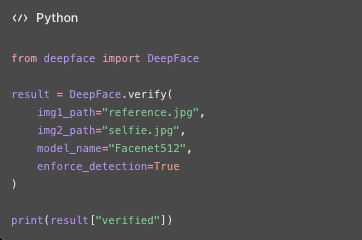
This example compares two local images and returns a verification result based on the selected model’s matching logic.
In a production environment, however, developers must implement suitable capture security, presentation attack detection, API authentication, data protection, and operational safeguards.
DeepFace is therefore better understood as a face matching component rather than a complete identity verification solution.
Best for: Python developers, research teams, custom biometric applications, and prototyping facial recognition systems.
Integration consideration: Developers must validate their chosen models, maintain dependencies, secure image handling, and independently evaluate whether the system is suitable for the intended security use case.
7. Persona: Managed Selfie Verification and Identity Workflows
Persona provides identity verification capabilities through APIs, SDKs, and configurable verification workflows.
Its selfie verification functionality combines face comparison with capture quality and liveness-related checks.
Rather than exposing only a basic image-comparison operation, Persona is designed around verification sessions and the broader identity onboarding process.
Developer capabilities:
- Selfie verification
- Face matching against identity references
- Liveness checks
- Identity verification inquiries
- API-based status retrieval
- Configurable workflow components
Persona is useful when an application requires selfie matching as part of a larger identity proofing process.
For example, a financial application can combine government ID verification with selfie verification to evaluate whether the person presenting the document matches its portrait.
Its developer documentation identifies face comparison, image quality, and liveness as distinct components of selfie verification.
Best for: KYC onboarding, regulated marketplaces, financial services, and applications needing managed identity verification workflows.
Integration consideration: Developers should assess workflow configuration, result retrieval, review states, webhook handling, and whether the platform provides sufficient control over individual verification components.
8. Sumsub: Face Authentication Within KYC Workflows
Sumsub provides identity verification and compliance-related services, including face authentication and selfie-based verification.
Its developer-facing capabilities support face matching and liveness checks within a broader applicant verification process.
Rather than requiring developers to assemble every verification component separately, Sumsub can handle multiple steps in an identity onboarding workflow.
Developer capabilities:
- Face authentication
- Liveness verification
- Selfie-to-document comparison
- Web and mobile verification SDKs
- Applicant verification workflows
- API-based verification results
Sumsub distinguishes between liveness results and face matching results.
For example, its face authentication responses can include FACE_LIVELINESS and FACE_MATCH checks, enabling applications to examine the outcome of each stage.
This is useful when building face verification for KYC because matching a selfie to a document photograph is only one part of establishing whether an identity submission is trustworthy.
Best for: Fintech applications, customer onboarding, regulated platforms, and identity verification workflows involving document checks.
Integration consideration: Evaluate applicant lifecycle management, verification levels, SDK configuration, webhook reliability, and manual review requirements.
9. Veriff: Identity Verification With Facial Matching
Veriff provides identity verification capabilities that combine document analysis, biometric matching, and fraud-related checks.
Developers typically integrate Veriff through its verification SDKs and APIs rather than building the entire face verification process themselves.
Its identity verification workflow can assess the relationship between a captured selfie and an identity document portrait.
Developer capabilities:
- Selfie-based identity verification
- Facial matching within identity checks
- Document verification
- Mobile and web integration options
- Verification session management
- Backend access to verification results
Veriff is suited to applications where the goal is not simply to compare two images, but to determine whether a user successfully completes a broader identity verification process.
For example, a marketplace can use document and selfie verification during account registration and then consume the verification result within its account approval process.
Best for: Digital onboarding, marketplace verification, financial services, and document-linked identity checks.
Integration consideration: Confirm which biometric results are exposed to your application, how verification decisions are delivered, and whether the workflow supports the required customization.
10. iProov: Biometric Verification With Liveness Assurance
iProov focuses on biometric face verification and liveness-related identity assurance.
Its technology is relevant to applications that must verify a person’s presence during a biometric capture rather than trusting an uploaded photograph alone.
Developers can integrate iProov into identity verification workflows using supported SDKs and service integrations.
Developer capabilities:
- Biometric face verification
- Liveness and presence assurance
- SDK-based biometric capture
- Integration into identity journeys
- Presentation attack defenses
- Verification result handling
An important distinction is that biometric capture assurance and face matching are related but separate controls.
A developer may need to verify both that the presented facial input is genuine and that it corresponds to the claimed identity.
iProov is particularly relevant when that capture assurance is a significant requirement in the authentication design.
Best for: Higher-assurance identity verification, remote onboarding, digital identity services, and applications concerned with presentation attacks.
Integration consideration: Confirm the exact service configuration, reference-image requirements, supported SDK platforms, deployment architecture, and integration responsibilities.
Face Verification API Comparison
The most useful comparison is not simply which software recognizes faces. It is how each option fits into the application’s architecture.
| Face Verification Software | Integration Model | Primary Strength | Best Developer Use Case |
| PrivateID | On-device SDK and verification protocol | Privacy-preserving biometric verification | Secure authentication and account recovery |
| Amazon Rekognition | Cloud API | AWS-native face comparison | Custom backend matching services |
| Microsoft Azure Face API | Cloud API | Azure ecosystem integration | Enterprise identity applications |
| Face++ | Cloud API and SDK | Direct 1:1 image comparison | Mobile and custom authentication |
| CompreFace | Self-hosted REST API | Infrastructure control | Private face matching deployments |
| DeepFace | Python library | Model flexibility | Research and custom application development |
| Persona | Managed API and SDK | Configurable verification workflows | KYC and onboarding |
| Sumsub | Managed API and SDK | Identity checks with face authentication | Regulated onboarding |
| Veriff | Managed verification API and SDK | Document-linked identity verification | Marketplace and financial onboarding |
| iProov | Biometric SDK and service integration | Liveness-focused assurance | Higher-assurance identity journeys |
These products do not all expose equivalent functionality. A bare face matching API requires developers to build much of the surrounding system, while a managed identity verification provider handles more of the workflow.
Choosing Between Cloud, On-Device, and Self-Hosted Matching
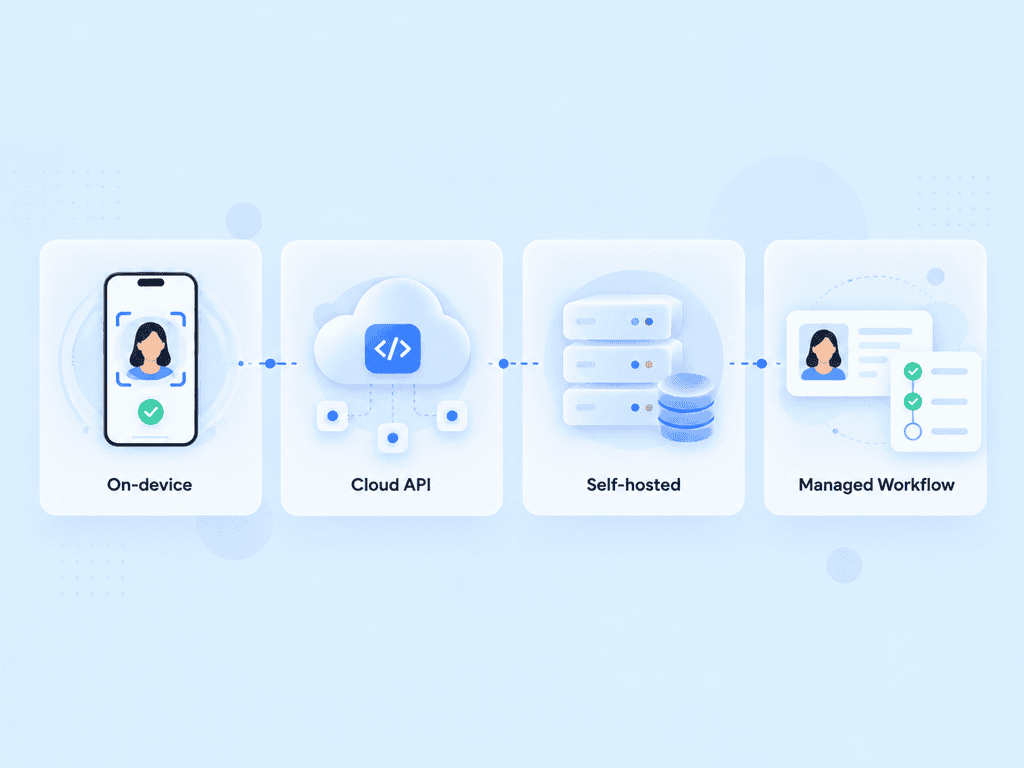
Cloud face verification APIs reduce infrastructure requirements and make it easier to call facial matching capabilities from an existing backend. However, applications must evaluate how biometric images are transmitted, processed, stored, and deleted.
On-device verification SDKs allow biometric operations to be performed locally when supported by the product architecture. This can reduce the need to transmit raw biometric images while introducing device compatibility and SDK lifecycle considerations.
Self-hosted frameworks provide direct control over processing infrastructure and model configuration. The trade-off is greater responsibility for deployment security, performance testing, privacy controls, and system maintenance.
For identity-sensitive applications, the choice of architecture can be as important as the selected matching algorithm.
How to Integrate Face Verification Into an Application
A successful face verification integration begins with the intended identity decision, not the API endpoint.
Before selecting a provider, developers should define what the application already knows about the user and what the biometric check must establish.
1. Define the Reference Identity and Verification Flow
Determine whether the application is comparing:
- A live selfie against an identity document portrait
- A live selfie against a previously enrolled face
- A biometric sample against an enrolled, privacy-preserving reference
- A returning user’s biometric verification against an established account
Each scenario has different requirements.
In KYC onboarding, developers may need document validation and identity proofing alongside biometric matching.
For returning-user authentication, a trusted enrollment process must establish the relationship between the user’s account and the biometric reference.
If that relationship was never established securely, accurate face matching cannot repair the underlying identity problem.
2. Implement Secure Capture and Liveness Controls
The application should capture biometric input through a controlled verification flow.
Capture quality checks can identify conditions such as poor lighting, unsuitable face positioning, or multiple faces in the frame.
Liveness detection addresses a different problem: whether the captured input originates from a genuine person rather than an attempted spoof.
Some implementations perform passive liveness checks without requiring users to complete additional gestures.
PrivateID, for example, offers on-device passive liveness detection that processes biometric capture information locally.
Developers should also account for attacks that bypass ordinary camera capture, including manipulated media or injected image streams where these are part of the threat model.
3. Connect the Face Verification API to Your Backend
A production integration generally needs to associate every verification with an authenticated or securely initiated application session.
The precise request structure depends on the provider, but developers should maintain a consistent internal verification interface.
For example, an application might normalize provider-specific responses into the following internal format:
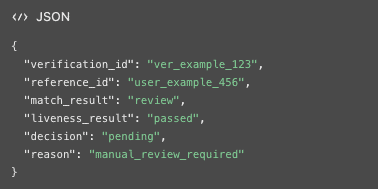
This is an illustrative application schema, not the API response format of any particular vendor.
Such normalization separates the identity provider’s output from the application’s final authorization decision.
It also allows developers to distinguish different failure conditions.
A failed liveness check is not the same as an insufficient similarity score. Neither should automatically be treated as proof of deliberate fraud.
For session-based systems, additional controls should include authenticated backend requests, short-lived verification sessions, replay protection, and appropriate logging without unnecessary biometric data exposure.
4. Calibrate Matching Thresholds and Handle Failures
Face match technology typically makes probabilistic comparisons.
A higher matching threshold may reduce false matches but can also increase the number of legitimate users who are rejected.
Developers should evaluate at least four operational measures:
| Metric | What It Measures | Why It Matters |
| False Match Rate (FMR) | Incorrectly matching different people | Security exposure |
| False Non-Match Rate (FNMR) | Incorrectly rejecting the same person | Legitimate-user friction |
| Verification completion rate | Users who complete the verification flow | Practical usability |
| End-to-end latency | Time required to reach a verification outcome | Application responsiveness |
These metrics should be measured against the actual devices, environments, and user populations expected in production.
A model’s similarity score should not be interpreted as a universal probability of identity. Thresholds and score meanings differ between providers.
Applications should also provide fallback procedures for users who cannot complete biometric verification because of accessibility needs, camera problems, or repeated capture failures.
5. Validate Privacy and Production Requirements
Before deployment, developers should document where biometric information exists throughout the workflow.
Important questions include whether raw images leave the device, whether reference data is stored centrally, how long verification artifacts remain available, and which systems can access them.
Teams should also test authentication failures, API timeouts, expired verification sessions, duplicate callbacks, and application recovery after interrupted capture.
The security design must consider the full process, including the trusted reference, not just the facial comparison operation.
For applications that use face verification during onboarding, the broader relationship between identity documents and the applicant’s claimed identity is equally important. PrivateID’s guide to types of document verification provides additional context for these checks.
Conclusion
The best face verification API depends on the application’s architecture, security requirements, and the identity decision it needs to make.
Cloud APIs offer convenient matching capabilities. Managed verification platforms handle larger onboarding workflows. Open-source tools provide more infrastructure control, while privacy-preserving SDKs offer alternative approaches to biometric processing and storage.
For developers building 1:1 identity matching, the most important decision is how facial verification fits into a secure, privacy-conscious authentication flow.
Choose the integration model first, then validate matching accuracy, liveness protection, user experience, and data handling under realistic production conditions.
FAQs
What is a face verification API?
A face verification API allows an application to compare a captured facial image or representation against a known reference. It typically returns a similarity score or match result indicating whether the two inputs likely belong to the same person. Applications use this capability for authentication, onboarding, and identity verification.
What is the difference between 1:1 face matching and 1:N facial recognition?
1:1 face matching compares a facial sample against one claimed identity. By contrast, 1:N facial recognition searches a submitted face against multiple enrolled identities. For account authentication and selfie-to-ID matching, 1:1 verification is generally the more appropriate operation.
Can developers implement face verification without sending images to the cloud?
Yes. Certain on-device SDKs and self-hosted frameworks allow developers to perform biometric operations without transmitting raw images to a third-party cloud matching service. However, processing locally does not automatically eliminate all privacy or security risks. Developers still need to evaluate reference storage, access controls, device security, and retention policies.
Does face verification software include liveness detection?
Not always. Some solutions provide only image comparison, while others include liveness checks or offer them as an additional service. Developers should verify that liveness detection is available for their specific integration and that its protections address the attacks relevant to the application.
What is the best face verification API for KYC?
For KYC, managed identity verification solutions such as Persona, Sumsub, and Veriff may be appropriate when the application requires document verification, selfie matching, and workflow management together. PrivateID is also relevant for teams prioritizing privacy-preserving biometric verification. The final choice depends on compliance requirements, enrollment architecture, and integration needs.
Can I build a face verification API using Python?
Yes. Python frameworks such as DeepFace support facial verification and can be integrated into a custom backend. Developers can also use cloud providers’ Python SDKs. However, a production identity verification service requires additional security, liveness, privacy, and operational controls beyond a basic comparison function.
How accurate is face verification technology?
Accuracy depends on the recognition model, image quality, demographic variation, matching threshold, and deployment conditions. A model can perform well under controlled testing but produce different results with consumer cameras, poor lighting, or challenging capture environments. Developers should test false matches and false non-matches using representative data before deployment.