
 Back
Back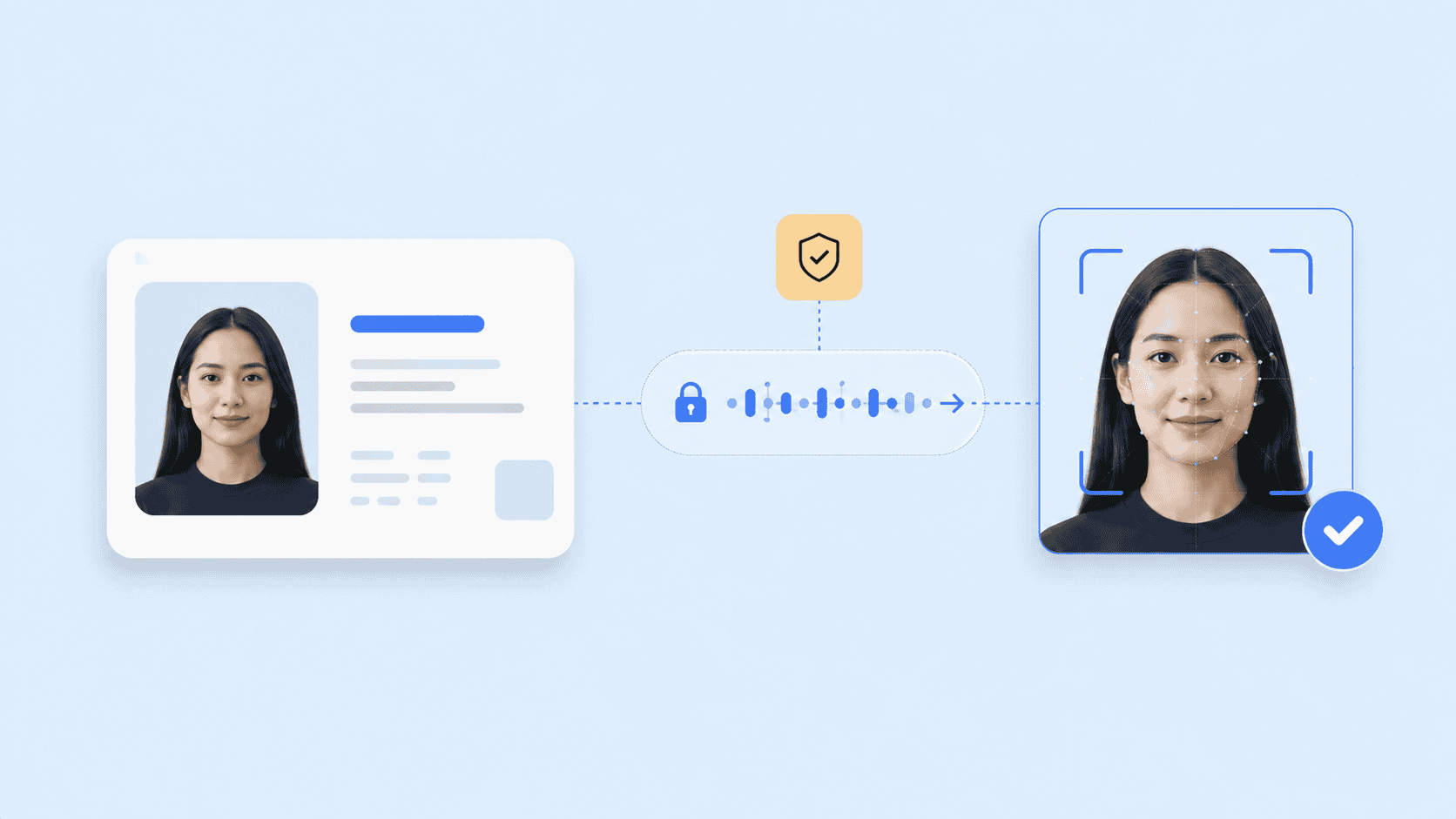
A camera captures a face, but the image alone cannot confirm who someone is. Facial recognition software must first locate the face, measure its distinguishing features, convert those measurements into numerical data, and compare the result with another facial record.
So, what is facial recognition software in practical terms? It is biometric software that uses computer vision and machine learning to verify or identify people from images or video. This article explains the full recognition process, the difference between verification and identification, common applications, and the security controls that determine whether a system can be trusted.
Key takeaways
- Facial recognition software converts facial characteristics into a numerical template or embedding that an algorithm can compare.
- One-to-one verification checks a claimed identity, while one-to-many identification searches for a person within a larger gallery.
- Image quality, matching thresholds, demographic performance, and enrollment controls all affect accuracy.
- Recognition should be paired with liveness detection when a system must confirm that a real person is present.
- Privacy depends heavily on where images and biometric templates are processed, transmitted, stored, and deleted.
What facial recognition software does
A useful face recognition software definition must distinguish recognition from ordinary face detection.
Face detection finds a human face within an image or video frame. It may draw a box around the face, count the number of people present, or help a camera focus correctly. It does not necessarily determine identity.
Facial recognition goes further. It analyzes the detected face and compares its biometric characteristics with one or more previously enrolled records. The software then produces a similarity score rather than a simple visual judgment.

This distinction matters because many applications marketed as “facial technology” perform different tasks:
| Function | What the software determines | Example |
| Face detection | Whether a face is present | A camera locating a face before capture |
| Face verification | Whether two faces belong to the same person | Comparing a selfie with an ID photograph |
| Face identification | Whether a face matches someone in a gallery | Searching an access-control watchlist |
| Face tracking | Whether the same face remains present across video frames | Following a participant during a video session |
| Facial analysis | An estimated attribute rather than identity | Estimating pose, image quality, or age range |
Recognition is therefore not the same as classification or facial analysis. Software that estimates whether a person is looking at a screen, for example, does not automatically know who that person is.
Verification and identification solve different problems
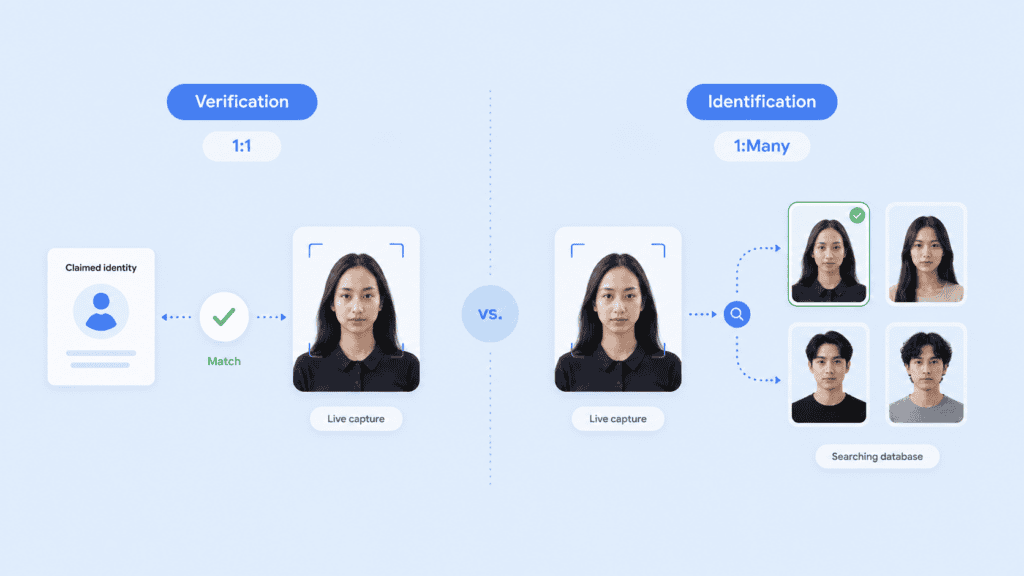
The most important design choice in a facial recognition system is whether it performs one-to-one verification or one-to-many identification.
One-to-one verification asks:
Does this face match the enrolled face associated with the claimed account?
A user may enter an email address, present an identity document, or use a passkey before providing a live facial capture. The system compares that capture with one known reference.
One-to-many identification asks:
Which enrolled identity, if any, matches this face?
The system compares one capture against a gallery containing multiple biometric records. This model may support duplicate-account detection, controlled access, or investigative searches.
Identification generally introduces more complex accuracy and privacy questions. Every additional candidate creates another opportunity for an incorrect match, so gallery size, thresholds, and review procedures matter.
How facial recognition works
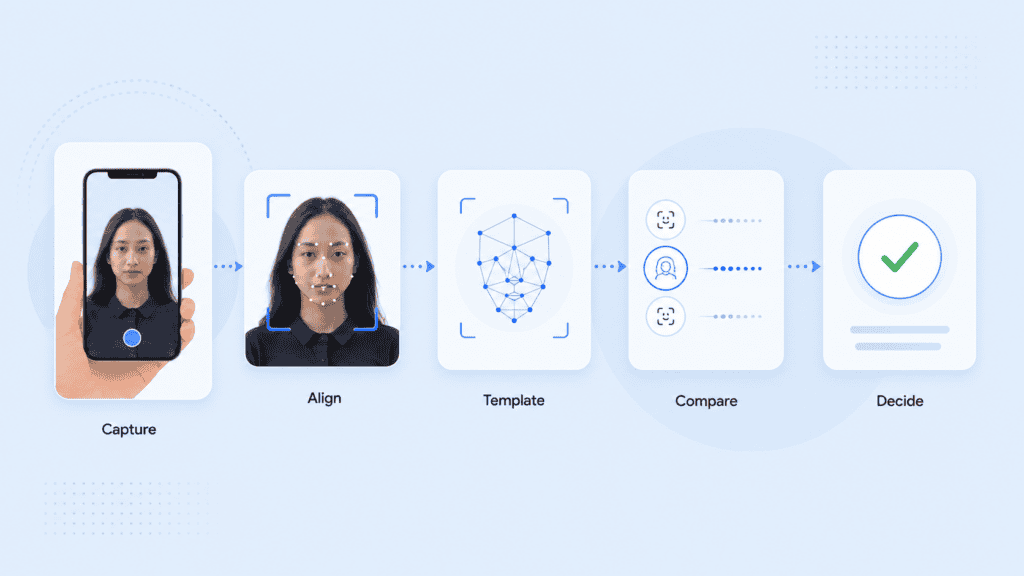
Although products differ, most facial recognition technology follows a similar pipeline.
1. The system captures an image or video frame
The process begins with a camera, uploaded photograph, document portrait, or video stream. Capture conditions immediately affect the quality of every later step.
Common quality problems include:
- Motion blur from an unsteady device
- Strong backlighting that obscures facial features
- A face that is too small within the frame
- A head turned too far from the camera
- Glasses, hair, masks, or other obstructions
- Image compression that removes useful detail
A well-designed application checks these conditions before attempting a match. Asking the user to move closer or improve the lighting is usually better than processing a poor image and returning an unexplained rejection.
2. Face detection isolates the relevant area
A detection model finds the face and separates it from the background. It may also identify facial landmarks such as the eyes, nose, mouth, and outline of the face.
The software uses these landmarks to align the image. For example, it can rotate or crop the capture so the eyes appear in a consistent position. This reduces variation caused by camera angle rather than identity.
3. The image is checked for quality
Quality assessment determines whether the sample contains enough usable information for recognition. This is not a cosmetic check. A sharp, evenly lit image usually gives the matching model more reliable data than a dark or heavily compressed frame.
Quality should be measured during both enrollment and later authentication. A weak enrollment image creates a weak reference that can affect every future comparison.
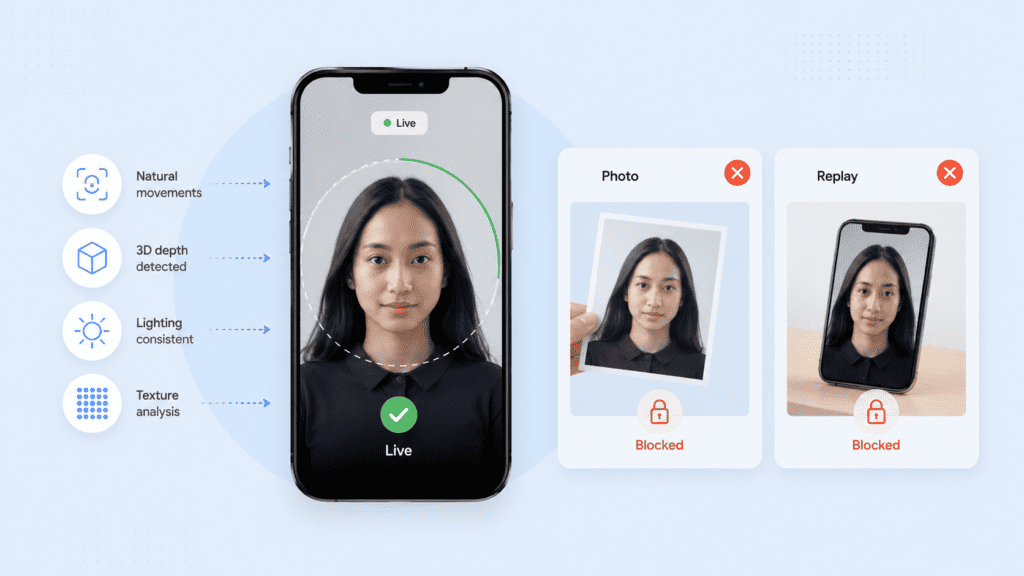
4. Liveness or presentation attack detection checks the capture
A recognition model can compare faces, but it may not know whether the camera is viewing a live person, a printed photograph, a screen replay, a mask, or manipulated media.
For identity and authentication workflows, the capture should therefore include liveness detection. This control is also called presentation attack detection (PAD).
Passive liveness systems analyze the capture without asking the user to perform an obvious action. Active systems may request a head turn, blink, spoken phrase, or guided movement. The appropriate method depends on the device, user experience, accessibility needs, and level of risk.
ISO/IEC 30107-3 provides a formal framework for testing and reporting biometric presentation attack detection systems. It also recognizes that PAD mechanisms can produce both false acceptances and false rejections, so the presence of an anti-spoofing feature alone does not prove its effectiveness. Review the ISO presentation attack detection standard.
5. Facial features become a mathematical representation
The aligned face is passed through a machine learning model, often a deep neural network. The model converts the visible characteristics into a set of numbers commonly called an embedding, template, or facial signature.
An embedding is not simply a list of distances between the eyes, nose, and mouth. Modern models learn complex patterns across facial regions from training data. The resulting vector represents features that help distinguish one face from another while tolerating reasonable changes in expression, pose, or lighting.
This is where the term facial recognition AI usually applies. Machine learning models learn how to produce useful representations and compare them, rather than relying only on manually programmed measurements.
6. The software compares facial representations
The system compares the new embedding with the relevant enrolled template or gallery. It calculates a similarity score that indicates how closely the representations correspond.
The score is then evaluated against a matching threshold:
- A score above the threshold may be treated as a match.
- A score below it may be treated as a non-match.
- A score close to the boundary may trigger another capture or manual review.
The threshold is a business and security decision, not a universal constant. Raising it may reduce false matches but increase the number of legitimate users rejected. Lowering it may improve convenience while accepting more risk.
7. A policy engine determines the outcome
The recognition score should not always make the final decision on its own. A complete workflow may also consider:
- Liveness results
- Device or session risk
- Document validation
- Account history
- Location anomalies
- The value or sensitivity of the requested action
- Whether the score falls into a manual-review range
For example, a low-risk account login may permit a second capture after a failed match. A high-value transaction may require a passkey or another authentication factor before approval.
NIST’s current Digital Identity Guidelines treat biometric characteristics as attributes that can help verify a physically present person, but they do not treat biometrics as an unrestricted replacement for every authenticator. The appropriate controls depend on the required assurance level and the wider authentication process. Read NIST Special Publication 800-63-4.
Where facial recognition software is used
The same underlying matching process can support very different applications. The use case determines whether the system needs one-to-one verification, one-to-many identification, continuous tracking, or a combination of controls.
Identity proofing and customer onboarding
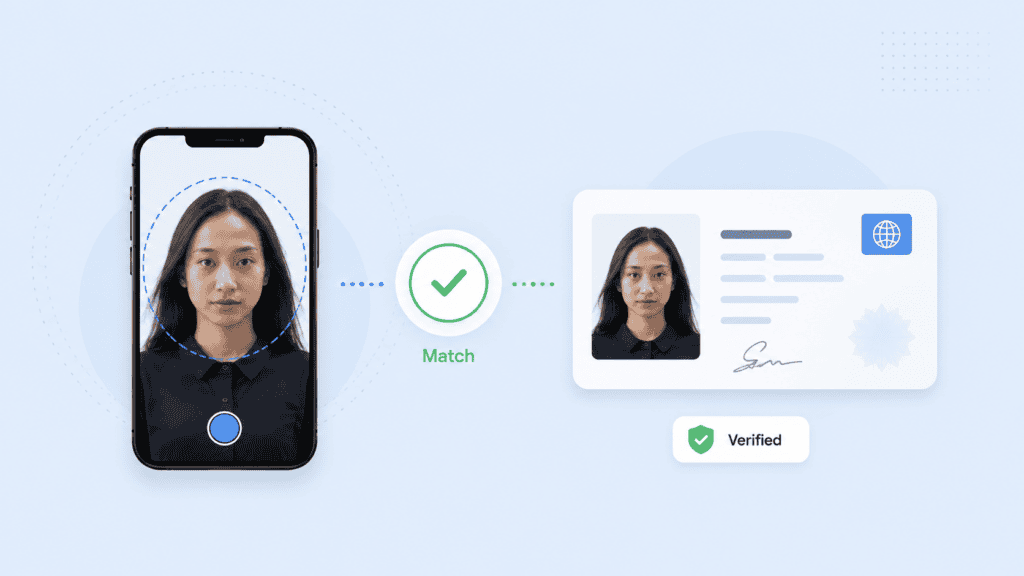
Remote onboarding often compares a live selfie with the portrait extracted from an identity document. The goal is to determine whether the applicant presenting the document appears to be its rightful owner.
A practical workflow may include:
- Capturing the identity document
- Checking document quality and authenticity
- Extracting the document portrait
- Capturing a live selfie
- Running liveness detection
- Comparing the selfie with the document portrait
- Routing uncertain results for another check or human review
Face matching does not validate the document itself. A convincing counterfeit document can still contain a photograph that matches the applicant. Organizations therefore combine facial comparison with document authenticity checks and trusted data sources.
Account authentication
Facial recognition can help a returning user access an account without entering a password for every session. It may also support step-up authentication before a payment, account recovery, profile change, or release of sensitive information.
This application usually relies on one-to-one verification. The user first claims an identity through an account, credential, or device, and the software checks the live face against that account’s enrolled reference.
Facial recognition is often more effective when combined with cryptographic credentials. Biometric authentication can confirm that the expected person is present, while a passkey can prove control of a registered authenticator.
Physical access control
Offices, data centers, warehouses, and controlled facilities may use facial recognition to support entry decisions. A camera at the access point captures a face and compares it with enrolled employee or visitor records.
The deployment still needs a fallback. Camera failure, injury, accessibility requirements, protective equipment, or poor lighting can prevent a legitimate match. A staffed review process, badge, or another approved factor prevents the biometric system from becoming a single point of failure.
Travel and border processing
Airports and border agencies may compare a traveler’s live image with a passport or government record. The aim is often to confirm that the traveler presenting the credential is the same person shown in the document.
These systems operate at large scale and under strict operational requirements. Camera placement, queue speed, lighting, demographic testing, human review, and legal authority all affect whether the deployment works responsibly.
Duplicate-account and fraud detection
One-to-many matching can check whether a new enrollment resembles an identity already registered in a system. This may help detect repeat applications, duplicate benefit claims, multiple accounts, or attempts to reuse the same person across different identities.
The process requires careful thresholds. A potential duplicate is not proof of fraud. Similar-looking relatives, poor captures, and algorithmic errors can produce candidates that need further investigation.
Video and media integrity
Facial tracking can follow an enrolled person across video frames, while other models examine the stream for manipulation or identity changes. This has applications in remote interviews, video support, protected media, and communication systems vulnerable to synthetic impersonation.
Recognition alone cannot reliably establish whether an entire video is genuine. It may need to work alongside deepfake detection, injection-attack controls, audio analysis, and session security.
Accuracy, security, and privacy considerations
Facial recognition software should not be judged by a single advertised accuracy percentage. Performance depends on the task, dataset, threshold, camera conditions, population, gallery size, and error being measured.
False matches and false non-matches
Two error types are especially important:
- A false match occurs when the system incorrectly concludes that two different people are the same.
- A false non-match occurs when the system fails to match two captures of the same person.
The cost of each error varies by application. A false match during a criminal investigation can have serious consequences. A false non-match during a low-risk login may only require the user to try again.
This is why an accuracy claim without its operating threshold, dataset, and error rates provides little useful information.
Image conditions can change performance
An algorithm tested on controlled portrait photographs may behave differently with mobile selfies, security-camera footage, low light, unusual camera angles, or partially covered faces.
Independent testing should resemble the planned deployment. Teams should not assume that a high benchmark result automatically transfers to every environment.
NIST operates ongoing face recognition evaluations covering one-to-one verification, one-to-many identification, image quality, masks, and other operational factors. These evaluations are valuable because they compare submitted algorithms under standardized conditions rather than relying solely on vendor testing. Explore NIST’s Face Recognition Technology Evaluation program.
Demographic performance must be measured
Error rates can differ across demographic groups and algorithms. NIST’s demographic effects research found that performance differences cannot be summarized with one claim because they vary by algorithm, application, dataset, and error type.
Organizations should therefore review false-match and false-non-match rates across relevant user groups. They should also monitor production outcomes, such as repeated capture failures or unusually high manual-review rates, rather than testing only an overall average.
Enrollment is a major attack point
A highly accurate matcher cannot correct an enrollment process that associates the wrong person with an account.
Suppose an attacker creates an account using stolen personal details but enrolls their own face. Later facial checks may work exactly as designed because the attacker’s live face matches the attacker’s enrolled template. The failure occurred before authentication, when the system established the original identity binding.
Secure enrollment may require document validation, liveness checks, authoritative data verification, device controls, and a clear process for resolving duplicate or disputed identities.
Biometric information requires special protection
A password can be reset after exposure. A face cannot be replaced in the same way.
The privacy impact depends on the architecture. Questions include:
- Does the raw image leave the user’s device?
- Is the reference stored as an image or biometric template?
- Can the stored representation be reused in another system?
- Which vendors, logs, and analytics tools receive biometric information?
- How long is each record retained?
- Can a user withdraw consent and request deletion?
- Is recognition performed locally, centrally, or through a third-party API?
The Federal Trade Commission has warned that biometric technologies can create privacy, security, bias, and discrimination risks. Its policy statement calls for reasonable data-security measures, careful assessment of foreseeable harms, and truthful representations about system capabilities. Read the FTC Policy Statement on Biometric Information.
A privacy-preserving facial recognition software architecture may process images on the device and limit the biometric information transmitted to central infrastructure. This can reduce exposure, but teams still need to verify the complete data flow rather than relying on a product label.
How to evaluate a facial recognition system
A product demonstration can show that a face matched. It cannot show whether the system will remain accurate, secure, and appropriate in production.
Start with the intended decision. Define whether the software verifies a claimed user, searches a gallery, checks for duplicate enrollment, or tracks identity through a session. Avoid adding one-to-many search simply because the product supports it.
Then document the complete workflow:
- Identify where the reference image or biometric template comes from.
- Record where capture, quality checks, liveness testing, and matching occur.
- List every system that receives images, templates, scores, or logs.
- Define the matching threshold and the reason for choosing it.
- Set separate procedures for matches, non-matches, and uncertain results.
- Provide a fallback for users who cannot or do not use face recognition.
- Establish retention, deletion, access-control, and incident-response rules.
Test with the devices, lighting, camera angles, network conditions, and users expected in the real deployment. Measure false matches, false non-matches, failure-to-enroll rates, liveness errors, completion time, retries, and manual reviews.
Finally, test the surrounding process. Attempt enrollment with a stolen document, replayed video, injected camera feed, printed face, screen display, and duplicate account. Facial recognition is only one control within that system.
Conclusion
The clearest answer to “what is facial recognition software?” is that it is a biometric comparison system, not simply a camera feature. It detects a face, creates a mathematical representation, compares that representation with enrolled data, and applies a threshold to determine similarity.
The quality of the matcher matters, but responsible deployment depends just as much on enrollment, liveness testing, data handling, fallback methods, and the decisions made after a possible match.
FAQs
What is facial recognition software used for?
Facial recognition software is used for identity verification, account authentication, physical access, traveler processing, duplicate-account detection, and controlled searches. The appropriate design depends on whether the application needs one-to-one verification or one-to-many identification.
Is facial recognition the same as face detection?
No. Face detection locates a face within an image or video frame. Facial recognition compares the detected face with an enrolled reference or gallery to estimate whether an identity matches.
How does facial recognition AI identify a person?
A machine learning model converts facial characteristics into a numerical embedding. The system compares that embedding with stored facial representations and produces a similarity score, which is evaluated against a configured threshold.
Can facial recognition be fooled by a photograph?
A recognition model may match a photograph if it does not have an effective method for checking whether a live person is present. Liveness or presentation attack detection helps identify printed photos, screens, masks, replays, and other spoofing attempts.
Is facial recognition always accurate?
No facial recognition system is error-free. Accuracy changes with the algorithm, threshold, image quality, demographic group, camera conditions, enrollment process, and size of the gallery being searched.
Does facial recognition store a photograph of your face?
Some systems store raw photographs, while others store biometric templates or process the comparison locally. Organizations should examine the full architecture because templates, logs, backups, and transmitted images may all create different privacy risks.
What is the difference between facial recognition and facial authentication?
Facial recognition is the broader technology for comparing faces. Facial authentication is a specific one-to-one use case in which the system checks whether a live face matches the identity associated with an account or credential.